FinOps Operator Exporter
This repository is part of the wider exporting architecture for the Krateo Composable FinOps and manages the exporting from API endpoints of FOCUS cost reports.
Summary
Overview
This finops-operator-exporter is tasked with the creation of a generic exporting pipeline, according to the description given in a Custom Resource (CR). After the creation of the CR, the operator reads the "exporting" configuration and creates three resources: a deployment with a generic prometheus exporter inside, a configmap containing the exporter configuration CR and a service that exposes the deployment. The given endpoint is supposed to be a CSV file containing a FOCUS report. Then, it creates a new CR for the FinOps Operator Scraper, which starts a generic scraper to upload the data to a database. The configmap is mounted as a volume inside the deployment and the service is used to expose the metrics collected by the exporter in the prometheus format.
Architecture
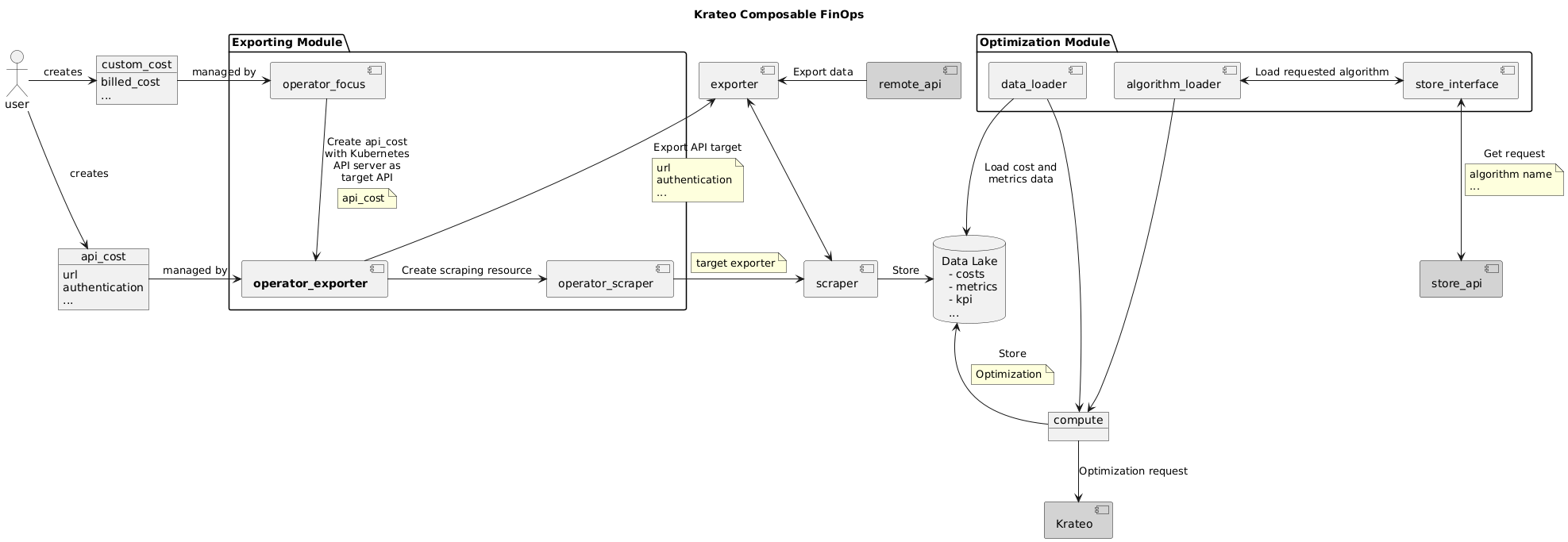
Examples
apiVersion: finops.krateo.io/v1
kind: DatabaseConfig
metadata:
  name: # DatabaseConfig name
  namespace: # DatabaseConfig namespace
spec:
  username: # username string
  passwordSecretRef: # object reference to secret with password
    name: # secret name
    namespace: # secret namespace
    key: # secret key
---
apiVersion: finops.krateo.io/v1
kind: ExporterScraperConfig
metadata:
  name: # ExporterScraperConfig name
  namespace: # ExporterScraperConfig namespace
spec:
  exporterConfig: # same as krateoplatformops/finops-prometheus-exporter-generic
    api: # the API to call
      path: # the path inside the domain
      verb: GET # the method to call the API with
      endpointRef: # secret with the url in the format http(s)://host:port, it can contain variables, such as http://<varName>.com:<envExample>, which will be compiled with the additionalVariables fields
        name:
        namespace:
    # metricType: # optional, one of: cost, resource, generic; default value: cost
    # generic: # option, required if metric type is generic
    #  valueColumnIndex: # index of the metric value
    #  metricName: # name to use for the metric in prometheus
    pollingInterval: # time duration, e.g., 12h30m
    additionalVariables:
      varName: sample
      # Variables whose value only contains uppercase letters are taken from environment variables
      # FROM_THE_ENVIRONMENT must be the name of an environment variable inside the target exporter container (e.g., kubernetes services)
      envExample: FROM_THE_ENVIRONMENT
  scraperConfig: # same fields as krateoplatformops/finops-prometheus-scraper-generic
    tableName: # tableName in the database to upload the data to
    # api: # api to the exporter, optional (if missing, it uses the exporter)
    pollingInterval: # time duration, e.g., 12h30m
    scraperDatabaseConfigRef: # See above kind DatabaseConfig
      name: # name of the databaseConfigRef CR
      namespace: # namespace of the databaseConfigRef CR
If the field metricType is set to cost, then the API in url must expose a FOCUS report in a CSV/JSON file. Otherwise, if set to resource, it must expose usage metrics according to the JSON/OPENAPI schema in the folder resources and the field additionalVariables must contain a field ResourceId with the identifier of the resources to be used in the database as external key to reference the cost metric from the usage metric (i.e., the same as the field resourceId of the focusConfig CR).
The metricType generic removes checks on the schema, allowing for the upload of arbitrary data. However, there is still the need to point out which field is the data point and what is the name of the metric:
- the
valueColumnIndextells us which field will be the metric value: for CSV its the column index, for JSON its the index for all the keys sorted alphabetically for all the objects. - the
metricNameinstead allows to specify a name for the metric, which will also be used by the scraper to select only a specific metric if the type is generic (e.g., exporting/scraping from a prometheus endpoint with many metrics)
Additionally, this feature will be used to upload metrics in the Prometheus API format, allowing the use of the Prometheus Exporting Stack for pods, nodes, etc. inside the cluster and not relying on external data coming from service providers.
The configuration for the Prometheus API looks like this:
apiVersion: finops.krateo.io/v1
kind: ExporterScraperConfig
metadata:
  name: exporterscraperconfig-sample
  namespace: krateo-system
spec:
  exporterConfig:
    api:
      path: /api/v1/query?query=container_cpu_usage_seconds_total
      verb: GET
      endpointRef:
        name: promethes-endpoint
        namespace: prom-system
    metricType: generic
    generic:
      valueColumnIndex: 14
      metricName: cpu
    pollingInterval: "1m"
  scraperConfig:
    pollingInterval: "1m"
    tableName: testprom
    scraperDatabaseConfigRef:
      name: finops-database-handler
      namespace: krateo-system
---
apiVersion: v1
kind: Secret
metadata:
  name: promethes-endpoint
  namespace: prom-system
stringData:
  server-url: http://kind-prometheus-kube-prome-prometheus.monitoring.svc:9090
The field spec.scraperConfig.api can be left empty if the exporter and scraper are both configured. The operator will compile this field automatically.
Example Use Case
The Composable FinOps can be used to display pricing, costs and optimizations in the Krateo Composable Portal through a dedicated blueprint. You can find out more here:
Configuration
To start the exporting process, see the examples section. The configuration sample includes the database-config CR.
The exporter container is created in the namespace of the operator. The exporter container looks for a secret in the CR namespace called registry-credentials, configurable in the HELM chart.
The FOCUS data needs to be in the CSV/JSON format and the Tags column has to use the following format:
{"CostCenter": "1234","Cost department": "Marketing","env": "prod","org": "trey","Project": "Foo"}
Environment variables
| Variable | Required | Default | Description |
|---|---|---|---|
POLLING_INTERVAL | No | 300 | Polling interval of the operator in seconds |
MAX_RECONCILE_RATE | No | 1 | Number of workers for the operator |
REGISTRY | No | ghcr.io/krateoplatformops | Registry to pull the exporter image from |
REGISTRY_CREDENTIALS | No | registry-credentials | Name of the secret holding registry credentials |
EXPORTER_VERSION | No | 0.5.0 | Version of the exporter image |
EXPORTER_NAME | No | finops-prometheus-exporter | Name of the exporter image |
Installation with HELM
The operator can be installed through its Helm chart.
Dependencies
To run this repository in your Kubernetes cluster, you need to install the following Krateo Composable FinOps components
- operator-scraper
- finops-database-handler
Additionally, you need to have a working CrateDB instance to store the scraped data.